2019年1月28日星期一

Enable SMB 1.0/CIFS File Sharing Support (It will help the printer & linux access Win10 SMB share)

  1. Click and open the Search Bar in Windows 10
    Type Windows Features in the search bar
    Double Click Turn Windows Features off and On
  2. Scroll down to SMB 1.0/CIFS File Sharing Support
  3. Check the box net toSMB 1.0/CIFS File Sharing Support 
    Click OK to accept the changes
  4. Restart your win10 computer


  1. 控制台
  2. 程式集
  3. 開啟或關閉WINDOWS功能
  4. 捲下並找出SMB 1.0/CIFS File Sharing Support
  5. 選擇使用

6.重啟電腦

2019年1月16日星期三

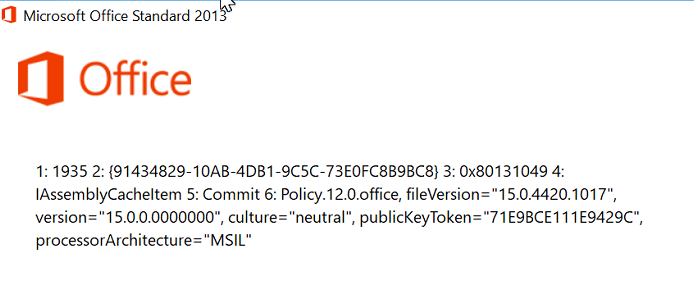
Install Office 2016 encounter error 1935 on brand new PC(Lenovo/HP/Dell)

Fix link from microsoft
https://docs.microsoft.com/en-us/dotnet/framework/install/repair

download the NetFxRepairTools.exe

Error similar to this!

Image

2018年8月21日星期二

Linux create softlink

user01 is the user id and the softlink name under / root

ln -s /home/e-smith/files/users/user01/home user01

SME Linux SSH autoblock

The Link

 https://wiki.contribs.org/AutoBlock


Default values

AutoBlockTime=900           # 900 seconds  (15 minutes).
AutoBlockTries=4            # meaning that 3 Tries are allowed, the fourth trie is blocked.
AutoBlock=disabled          # default for SME Server 8
AutoBlock=enabled           # default for SME Server 9

How to tune hitrates?

db configuration setprop sshd AutoBlockTries {n} # [ignore parentheses, just enter a number]
signal-event remoteaccess-update

How to tune Blocktime?

db configuration setprop sshd AutoBlockTime {s} # [ignore parentheses, just enter a number]
signal-event remoteaccess-update

How to disable/enable SSH_Autoblock?

db configuration setprop sshd AutoBlock disabled
or:
db configuration setprop sshd AutoBlock enabled
followed by:
signal-event remoteaccess-update

How to access the AutoBlock history?

  • For SME8:
cat /proc/net/ipt_recent/SSH
  • For SME9:
cat /proc/net/xt_recent/SSH

the current block status

How to display the current block status for the last 100 IP addresses seen:
iptables -L SSH_Autoblock -v

How clear logs

A local system admin logged as root may clear the SSH_AutoBlock history at any time with the following:
  • For SME8:
echo clear > /proc/net/ipt_recent/SSH    
  • For SME9:
echo "/" > /proc/net/xt_recent/SSH

Linux Change Shell access

Use this to check any shell in the Linux system

cat /etc/shells

[root@server01 ~]# cat /etc/shells
/bin/bash
/bin/bash2
/sbin/e-smith/console
/bin/csh
/bin/false
/usr/bin/rssh
/bin/sh


Then use this to check which shell the user is using (ithk01 is the user id)
grep ithk01 /etc/passwd


Then use

chsh --shell /bin/bash ithk01


For SME Linux do this

Shell Access

  • I need to give a user shell access to the SME Server.
Shell access should only be provided to users who have a *need* for it and can be trusted.
Before a user can have shell access Admin must enable ssh access at
server-manager -> Security -> Remote Access
You then enable shell access for a user by:
db accounts setprop username Shell /bin/bash
chsh -s /bin/bash username

2018年2月16日星期五

狗年2018新年即興!

 每日回顧思念主愛,
                 新年更新體驗神恩!  

2017年7月12日星期三

HP Linux Raid info (Tested under Centos 6.9)

HP System Management 
https://h20566.www2.hpe.com/hpsc/swd/public/detail?swItemId=MTX_6c49e131b4dc46fd937a652120 
 
HP Array Controller Unit Command Line Interface HPACUCLI
http://h20564.www2.hpe.com/hpsc/swd/public/detail?swItemId=MTX_d6ebba0f5cd642edace4648b9a 
 
CLI  status show
hpacucli controller slot=0 physicaldrive all show
 
CLI monitoring script example: 

slot=0 means build in controller if you use additional raid then you need to update the controller slot number
#!/bin/bash
###
#If disk and RAID went wrong with HP raid controller this script will send an email 
###
MAIL=info@ljhk.com
HPACUCLI=`which hpacucli`
HPACUCLI_TMP=/tmp/hpacucli.log


  if [ `hpacucli controller slot=0 physicaldrive all show | grep '(Failed|Rebuilding)'| wc -l` -gt 0 ]
  then
   msg="HP RAID Controller Errors"
   #echo $msg
   #$msg2=`hpacucli controller slot=0 physicaldrive all show`
   logger -p syslog.error -t RAID "$msg"
   $HPACUCLI controller slot=0 physicaldrive all show > $HPACUCLI_TMP
   mail -s "$HOSTNAME [ERROR] - $msg" "$MAIL" < $HPACUCLI_TMP
   #rm -f $HPACUCLI_TMP
  #else
  #echo "Everything Good"
   fi