2019年8月21日星期三
2019年7月5日星期五
Manual use YUM to install SETUP command on Centos minimal installation
Centos minimal install.
Manual use YUM to install SETUP command
$ yum install -y setuptool ntsysv system-config-*
After install complete then
$ setup
2019年1月28日星期一
Enable SMB 1.0/CIFS File Sharing Support (It will help the printer & linux access Win10 SMB share)
- Click and open the Search Bar in Windows 10
Type Windows Features in the search bar
Double Click Turn Windows Features off and On - Scroll down to SMB 1.0/CIFS File Sharing Support
- Check the box net toSMB 1.0/CIFS File Sharing Support
Click OK to accept the changes - Restart your win10 computer
- 控制台
- 程式集
- 開啟或關閉WINDOWS功能
- 捲下並找出SMB 1.0/CIFS File Sharing Support
- 選擇使用
6.重啟電腦
2019年1月16日星期三
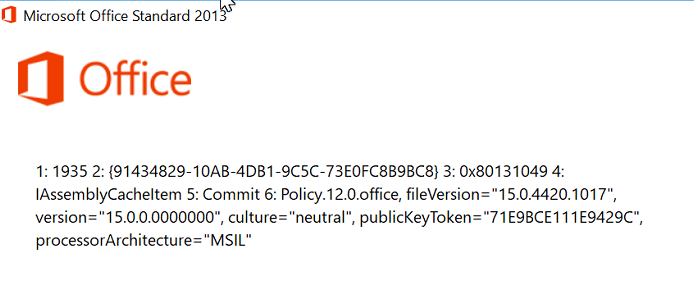
Install Office 2016 encounter error 1935 on brand new PC(Lenovo/HP/Dell)
Fix link from microsoft
https://docs.microsoft.com/en-us/dotnet/framework/install/repair
download the NetFxRepairTools.exe
Error similar to this!
https://docs.microsoft.com/en-us/dotnet/framework/install/repair
download the NetFxRepairTools.exe
Error similar to this!
2018年8月21日星期二
Linux create softlink
user01 is the user id and the softlink name under / root
ln -s /home/e-smith/files/users/user01/home user01
SME Linux SSH autoblock
The Link
https://wiki.contribs.org/AutoBlock
Default values
AutoBlockTime=900 # 900 seconds (15 minutes).
AutoBlockTries=4 # meaning that 3 Tries are allowed, the fourth trie is blocked.
AutoBlock=disabled # default for SME Server 8
AutoBlock=enabled # default for SME Server 9
How to tune hitrates?
db configuration setprop sshd AutoBlockTries {n} # [ignore parentheses, just enter a number]
signal-event remoteaccess-update
How to tune Blocktime?
db configuration setprop sshd AutoBlockTime {s} # [ignore parentheses, just enter a number]
signal-event remoteaccess-update
How to disable/enable SSH_Autoblock?
db configuration setprop sshd AutoBlock disabled
or:
db configuration setprop sshd AutoBlock enabled
followed by:
signal-event remoteaccess-update
How to access the AutoBlock history?
- For SME8:
cat /proc/net/ipt_recent/SSH
- For SME9:
cat /proc/net/xt_recent/SSH
the current block status
How to display the current block status for the last 100 IP addresses seen:
iptables -L SSH_Autoblock -v
How clear logs
A local system admin logged as root may clear the SSH_AutoBlock history at any time with the following:
- For SME8:
echo clear > /proc/net/ipt_recent/SSH
- For SME9:
echo "/" > /proc/net/xt_recent/SSH
Linux Change Shell access
Use this to check any shell in the Linux system
cat /etc/shells
[root@server01 ~]# cat /etc/shells
/bin/bash
/bin/bash2
/sbin/e-smith/console
/bin/csh
/bin/false
/usr/bin/rssh
/bin/sh
Then use
chsh --shell /bin/bash ithk01
For SME Linux do this
cat /etc/shells
[root@server01 ~]# cat /etc/shells
/bin/bash
/bin/bash2
/sbin/e-smith/console
/bin/csh
/bin/false
/usr/bin/rssh
/bin/sh
Then use this to check which shell the user is using (ithk01 is the user id)
grep ithk01 /etc/passwdThen use
chsh --shell /bin/bash ithk01
For SME Linux do this
Shell Access
- I need to give a user shell access to the SME Server.
Shell access should only be provided to users who have a *need* for it and can be trusted.
Before a user can have shell access Admin must enable ssh access at
server-manager -> Security -> Remote Access
You then enable shell access for a user by:
db accounts setprop username Shell /bin/bash
chsh -s /bin/bash username
訂閱:
文章 (Atom)